
Thermoplastic polyurethane (TPU) filament is a popular choice among 3D printing enthusiasts and professionals due to its unique combination of flexibility, durability, and versatility. TPU is a thermoplastic elastomer that can be stretched and bent without breaking, making it ideal for applications that require elastic properties. This filament is commonly used for manufacturing phone cases, wearable devices, flexible hinges, and flexible parts.
The popularity of TPU stems from its ability to create objects that can withstand mechanical stress and environmental influences. It offers excellent resistance to abrasion, chemicals, and oils, making it suitable for both consumer and industrial applications. Furthermore, TPU filament is available in various Shore hardnesses, such as 77D > 70D > 55D > 95A > 85A > 83A > 80A > 75A > 70A, allowing users to select the appropriate flexibility for their specific project requirements.
The importance of optimal print settings for TPU filament
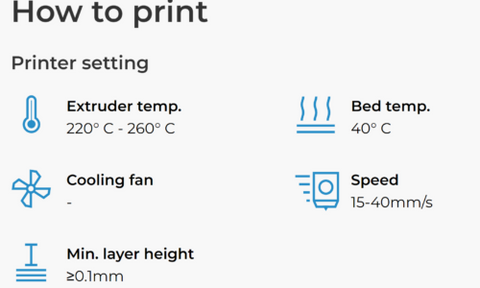
Printing with TPU filament requires precise control of print settings to achieve the best results. Unlike rigid filaments such as PLA or ABS, the flexible nature of TPU can be challenging if settings are not properly calibrated. Optimal print settings ensure that the filament flows smoothly, adheres well to the print bed, and produces high-quality prints without issues like stringing, warping, or under-extrusion.
Key settings include print temperature, print speed, bed temperature, and retraction settings. Fine-tuning these parameters helps to minimize common problems associated with TPU printing and ensures that the final print retains the desired properties such as flexibility and strength.
Print temperature
For TPU filaments, the print temperature plays a crucial role in ensuring proper extrusion and layer adhesion. A common range for TPU print temperature is between 220°C and 260°C. If the temperature is set too low, under-extrusion can occur, resulting in weak prints with poor layer adhesion. Conversely, a temperature that is too high can cause overheating, leading to stringing and blobs. An optimal temperature is around 230°C, but this can vary depending on the brand of TPU filament used.
Print speed
Due to the flexible nature of TPU, printing at high speeds can lead to issues like under-extrusion or buckling of the filament. Reducing the print speed helps maintain control over the filament flow and improves print quality. An optimal print speed for TPU is usually between 15-40 mm/s. Slower speeds allow the extruder to handle the filament more effectively and avoid issues like skipping or jamming.
Bed temperature
The temperature of the print bed is important to ensure good first-layer adhesion, which is critical for the success of the entire print. For TPU, a heated bed with a temperature of 40-60°C is generally recommended. If the bed temperature is too low, the filament may not adhere properly, leading to warping or detachment during the printing process. A temperature of approximately 50°C is a good balance for many TPU filaments.
Retraction settings
Retraction settings must be carefully adjusted to reduce stringing and oozing, which are common with TPU. Since TPU is more elastic, lower retraction distances and speeds are required compared to rigid filaments. For example, a retraction distance of 1-2 mm and a retraction speed of 20-30 mm/s are usually effective. With these settings, the filament can be retracted just enough to avoid jams or under-extrusion.
By adhering to these optimized settings, users can significantly improve the quality of their TPU prints. The correct print temperature ensures even extrusion and strong layer adhesion, while a moderate print speed helps maintain control over the filament. The correct bed temperature contributes to good first-layer adhesion, and fine-tuned retraction settings minimize stringing and oozing. Together, these settings lead to excellent prints that showcase the flexibility and durability of TPU.
Additional tips
Filament handling
Proper storage and handling of TPU filament is crucial, as it is hygroscopic and can absorb moisture from the air. Storing it in a dry box or using desiccant can prevent moisture-related printing defects.
Use direct drive extruders
Only direct drive extruders should be used for printing with TPU filament. Direct drive extruders offer better control over the filament feed, which is critical for handling the flexible nature of TPU. The shorter distance between the extruder and the nozzle minimizes filament buckling and improves print quality. Furthermore, TPU filament cannot be fed through an AMS (Automatic Material Switching) machine, as the flexibility of the material can lead to feeding issues and jams. Using a direct drive extruder ensures smooth and consistent extrusion, leading to higher print quality.
Optimizing slicer settings
Adjusting slicer settings for TPU can significantly impact print quality. Adjust layer height, wall thickness, and infill density according to the flexibility requirements of the print. For example, thicker walls and higher infill can improve the structural integrity of flexible parts.
Maintaining a clean nozzle
Keeping the nozzle clean and free of impurities ensures smooth filament flow. Regular maintenance and occasional cold pulls can prevent clogs and ensure consistent extrusion.
Troubleshooting common issues with TPU filament printing
Stringing
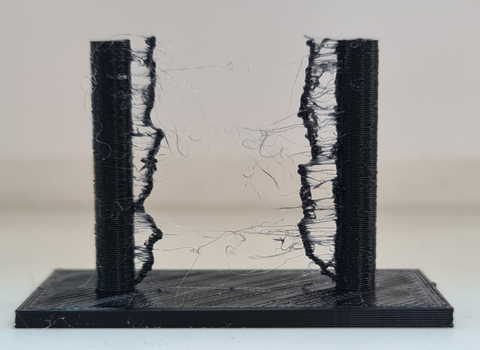
Stringing occurs when thin strands of filament are left behind during non-printing movements. To avoid this, adjust retraction settings, reduce the print temperature, and increase the travel speed.
Warping
Warping is less common with TPU due to its flexibility but can still occur. Ensure proper bed adhesion by using a heated bed and adhesion aids. Additionally, print in an enclosed chamber to ensure a stable temperature.
Under-extrusion
Under-extrusion can be caused by an incorrect print temperature, clogged nozzles, or issues with filament feeding. Check the filament path for obstructions, ensure the nozzles are clean, and verify that the print temperature is within the recommended range.
Layer shifting
Layer shifts can be caused by mechanical issues or faulty calibration. Ensure that the printer's belts and pulleys are properly tightened and that the print bed is level.
Innovations in TPU filament technology
The development of TPU filaments is constantly evolving, with manufacturers introducing new formulations to improve properties. Innovations include TPU blends that offer higher strength, greater flexibility, and better printability. Furthermore, some TPU filaments are now designed to be more resistant to UV light and harsh chemicals, expanding their range of applications.
Advanced TPU filaments with embedded conductive materials are also being developed, which open up possibilities for creating flexible electronic components. These advancements are pushing the boundaries of what can be achieved with TPU in home and industrial 3D printing.
Mastering TPU filament printing for superior results
Mastering the printing of TPU filaments requires understanding its unique properties and optimizing print settings to overcome challenges. By carefully adjusting print temperature, speed, bed temperature, and retraction settings, you can achieve high-quality prints with the desired flexibility and durability.
Applying tips and techniques such as using direct drive extruders, maintaining a clean nozzle, and regularly calibrating your printer will further improve your printing results. Keeping up to date with the latest innovations in TPU filament technology also opens up new possibilities for your 3D printing projects.
With some practice and attention to detail, you can harness the full potential of TPU filament to create flexible, durable, and versatile prints that meet a wide range of applications.
